All projects

AgentFlow

The AI platform banks and credit unions use to take a document from upload to decision. I wrote its frontend's first commit when it had no users; two years on, more than a hundred client people use it every week.

Client
Multimodal
Role
Founding frontend engineer
When
Aug 2024 – Oct 2026
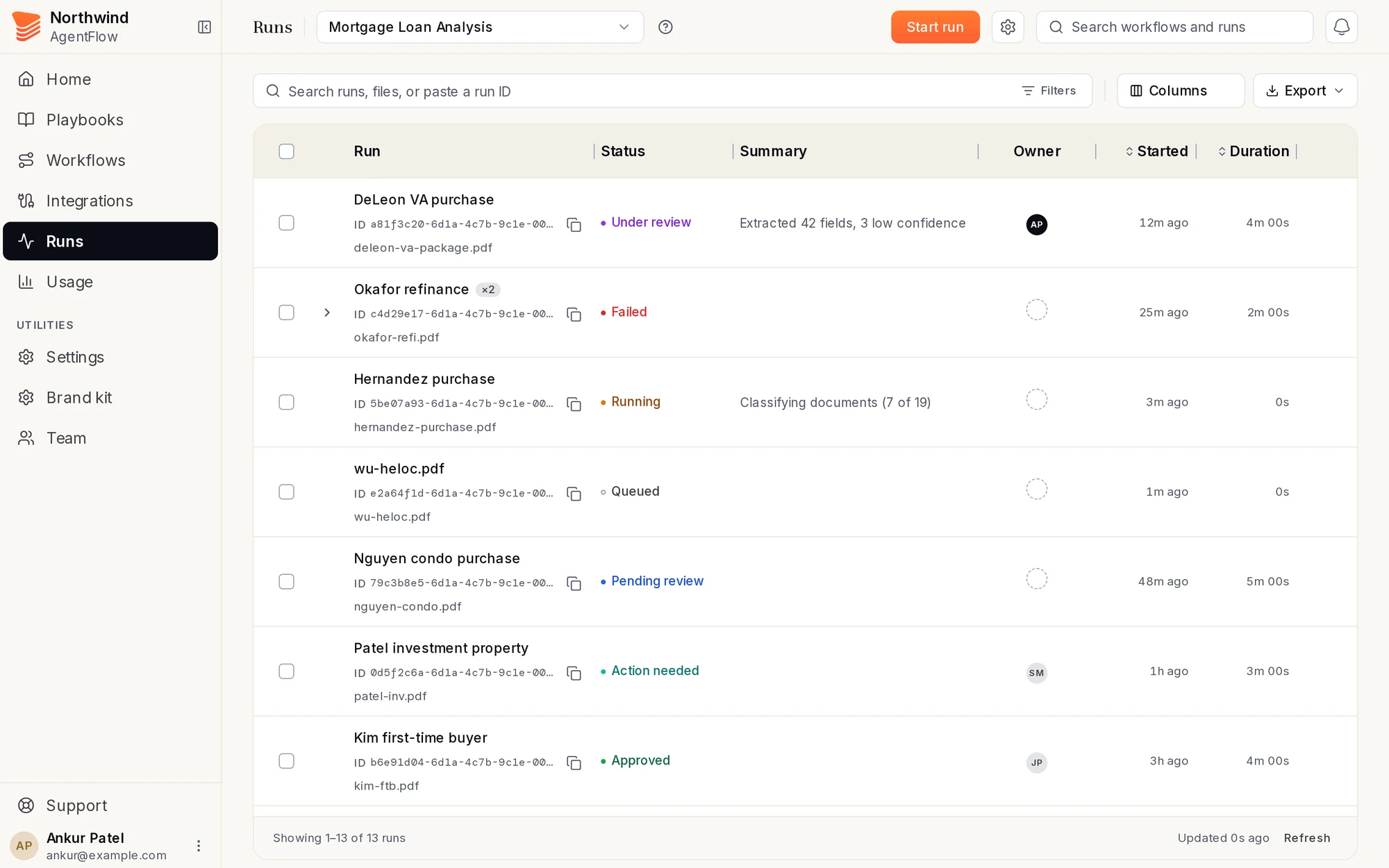
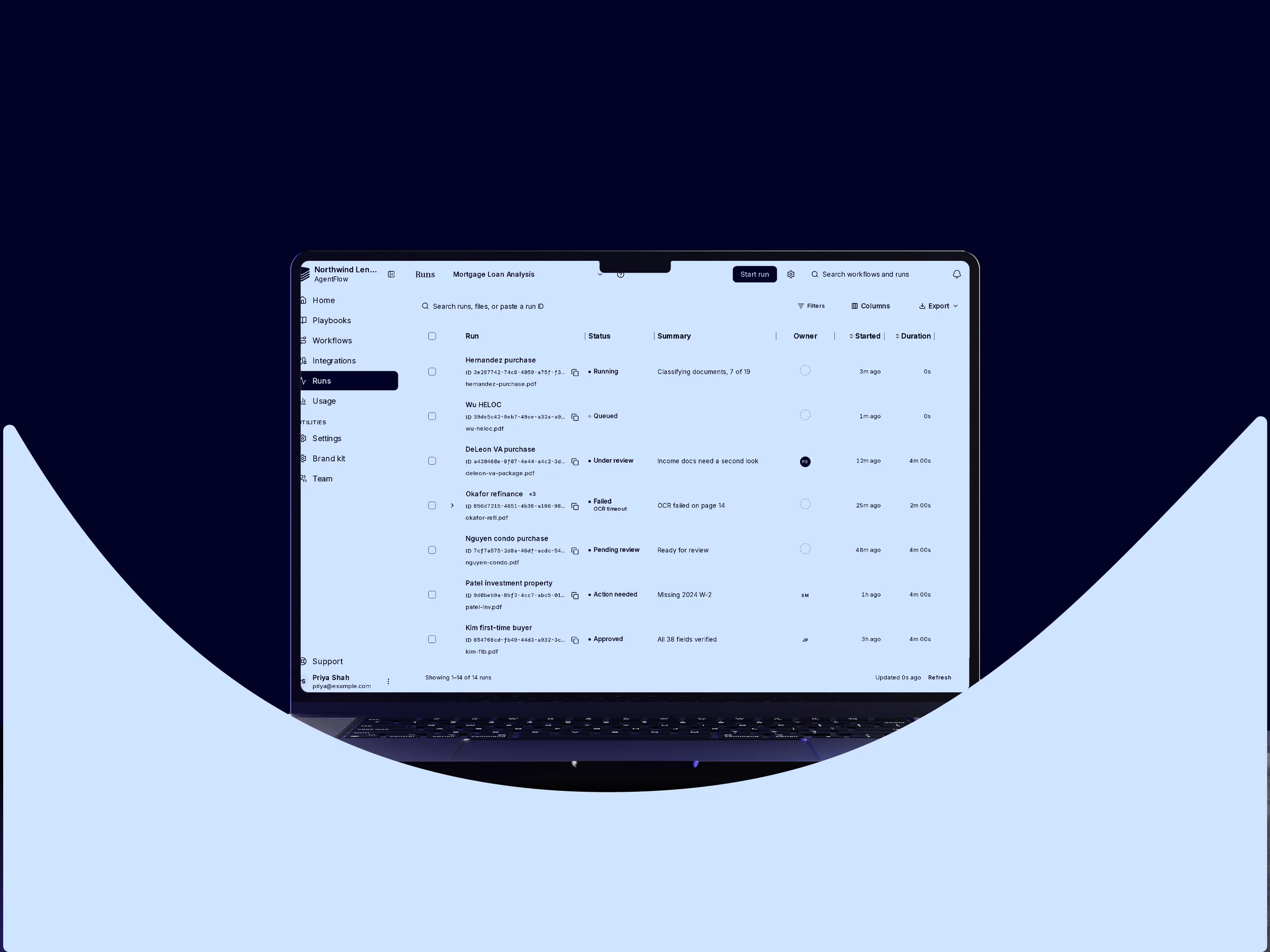
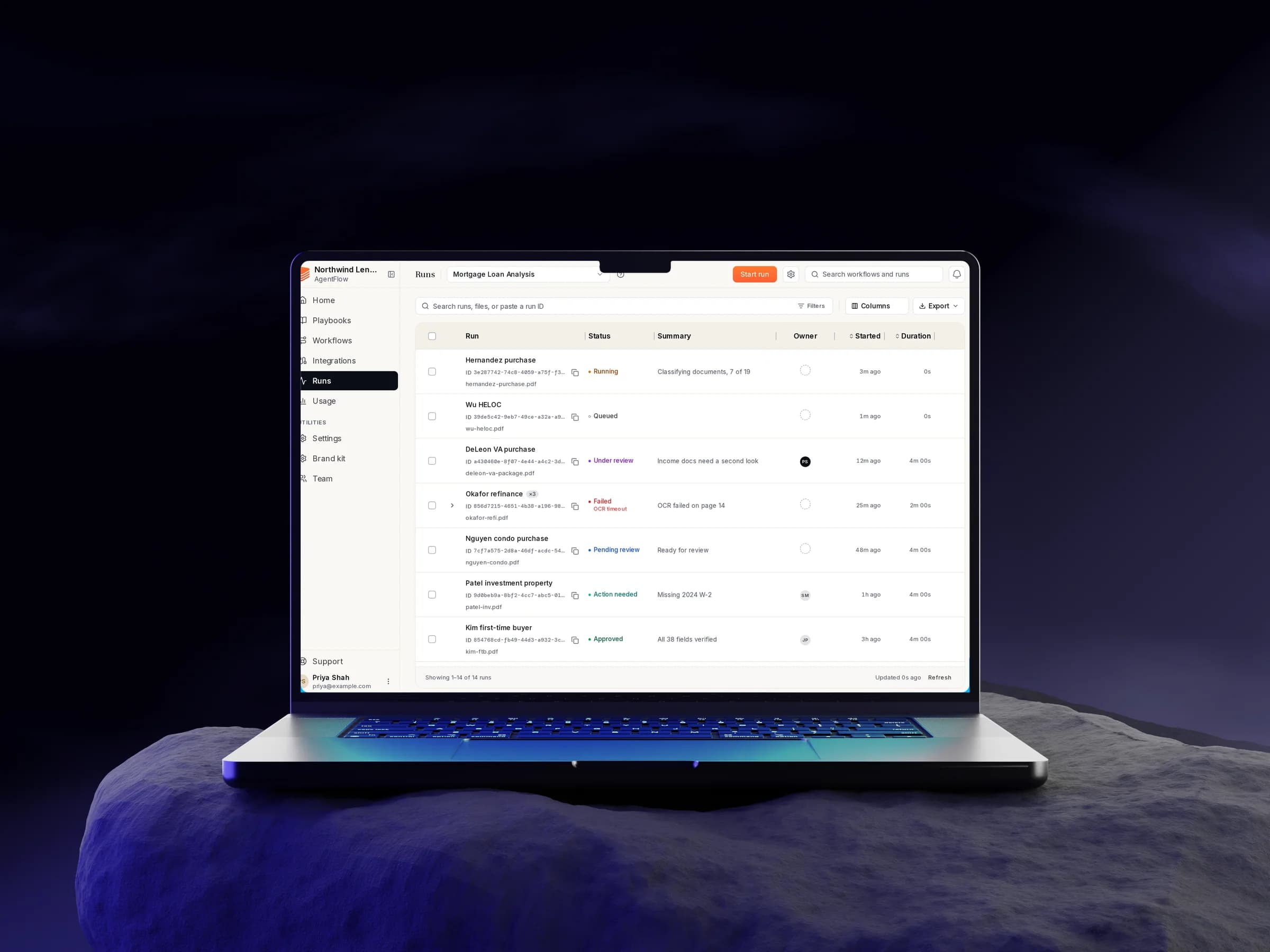
AgentFlow's Runs table on a laptop
  • Next.js
  • React
  • TypeScript
  • Tailwind
  • Storybook
  • Python / FastAPI
  • PostHog
  • Playwright

What it is

AgentFlow takes a business document, a loan application, a balance sheet, an invoice, through AI extraction, human review and a decision. Banks, credit unions and other financial firms run their daily work on it. Its largest client is a bank that rolled it out to its lending teams.

Reviewers live in two screens: the Runs table, where they find the document they need, and the review page, where they check what the AI read. Admins watch usage and manage their team.

My part

I wrote the first commit of AgentFlow's frontend in August 2024: the Next.js app, sign-in, the component kit and the data layer. Then I built its screens one by one as the product found its shape: review, configure, monitor, ingest, and a view for each kind of AI agent.

Over two years I built the screens those people work in every day: workflows, runs, document review, usage, team management, and the design system that ties them together. When a feature needed backend work I wrote that too, and I was one of the team's main frontend reviewers.

From zero to a hundred people a week

The problem. In August 2024 AgentFlow had no frontend and no users. Whoever came would judge it by the screens they worked in all day.

What I did.
  • Built those screens: the Runs table people find their documents in, the review page where they check the AI, Home, Usage and team settings.
  • Kept them quick and clear as use grew: one filter bar, search that answers as you type, one design system on every page.
  • Set up the product analytics, then used what people actually did to decide what to build next.

What changed. In the summer of 2026 a bank rolled AgentFlow out to its business lending teams, and since then more than a hundred client people have used it every week.
The first build

Aug 2024 – Oct 2025

AgentFlow started as a place for people to check the AI's work. I wrote the frontend's first commit, then built its screens one at a time as the product grew.

Day one

The problem. In August 2024 AgentFlow had a backend and an idea: AI agents read business documents, and a person checks their work. There was no frontend yet.

What I did.
  • Wrote the first commit: a Next.js App Router project with sign-in, a protected app shell and an analytics home.
  • Set the base every later screen was built on: a Tailwind and shadcn component kit, a typography scale, and React Query for server data.
  • Built the date-range picker the tables filter by, with typed dates, in that first commit.

What changed. The repository opens with my upload on 16 August 2024, and the team built on that base through every redesign since.

16 Aug 2024

my first commit, and the frontend's

The review page

The problem. The whole product rests on one moment: a person checking what the AI read before it counts. That needs the document and the AI's answer side by side, and a way to fix the answer.

What I did.
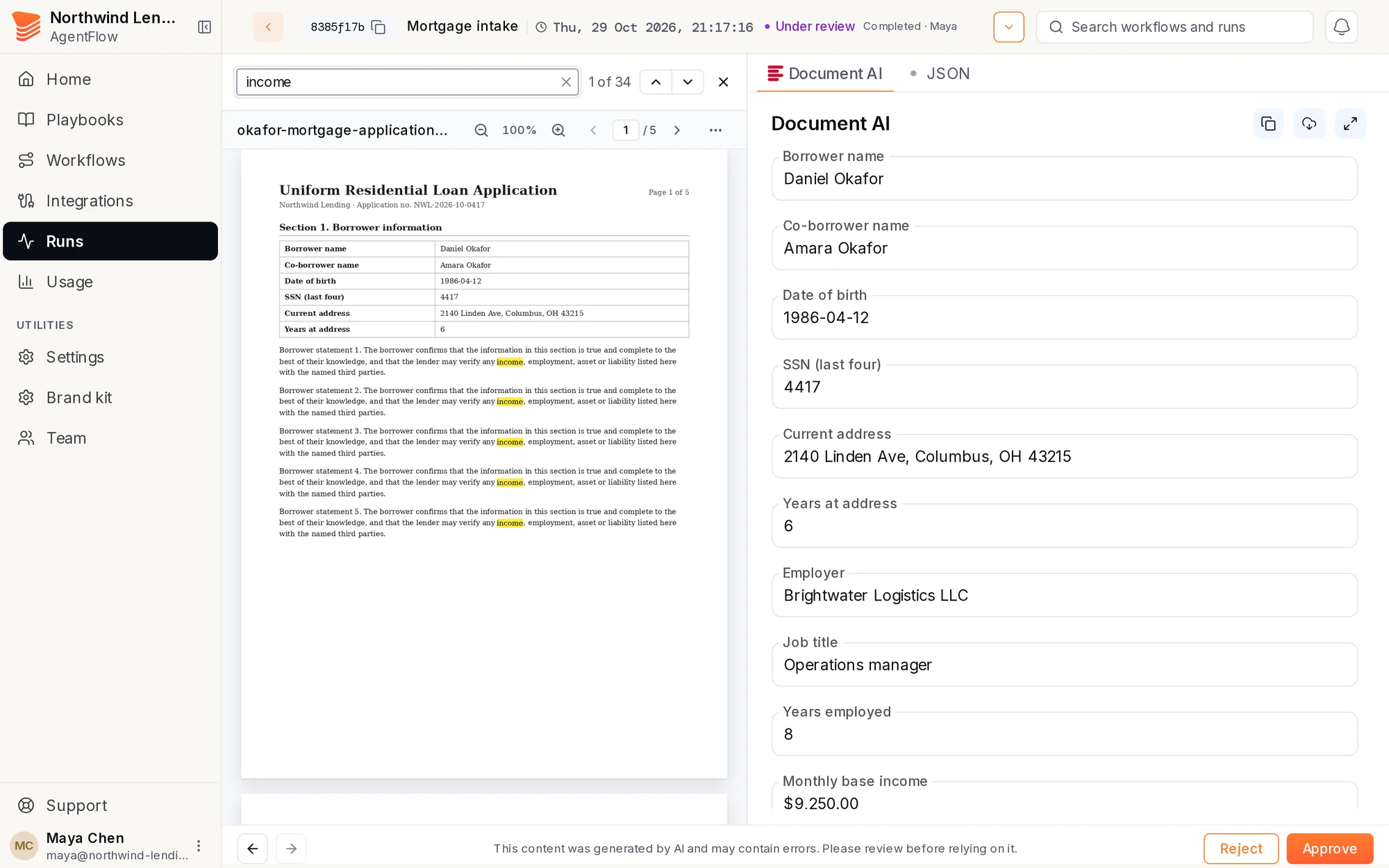
  • Built the review queue and the run page: the uploaded file on one side, the AI's fields as an editable form on the other, Approve and Reject at the bottom.
  • Made the document viewer something people can work in: zoom that holds, several files per run with their names, selectable text and search inside PDFs, and an expanded view that keeps your page.
  • Added what reviewers asked for: raw JSON with collapse and expand, copy and download on every table and JSON block, and a chat to ask the AI about the run.

What changed. It is the screen reviewers spend their day in. The picture is today's version, after the v3 redesign, but the shape is the one built in 2024 and 2025: file on the left, the AI's answer on the right, a decision at the bottom.

The run review page: a loan application with a search hit, and the extracted fields beside it
Today's run review page, searching inside the file. Demo data.

Set up, upload, watch

The problem. Around every review sit three other jobs: setting up what the AI should read, sending documents in, and seeing what ran, what failed and what it cost. Clients needed to do all three in the app, without asking the team.

What I did.
  • Configure: the Create workflow flow, a page to define each document type's fields, and one to annotate sample documents for it.
  • Create schema using AI: describe the fields you want, pick a model, and it drafts the document type's schema for you to edit.
  • Ingest: upload many files at once by drag and drop, and a table of every submission with its stats.
  • Monitor: status cards that filter the table, live refresh while a run is going, durations in whole seconds and cost in US dollars.

What changed. Setup, upload and monitoring all moved into the app, and in July 2025 Home became a dashboard that leads into them.

A screen for every agent

The problem. AgentFlow's AI does more than read fields. Each kind of agent returns something different, a report, a conversation, a decision, a class, and each needs its own way to be read and checked.

What I did.
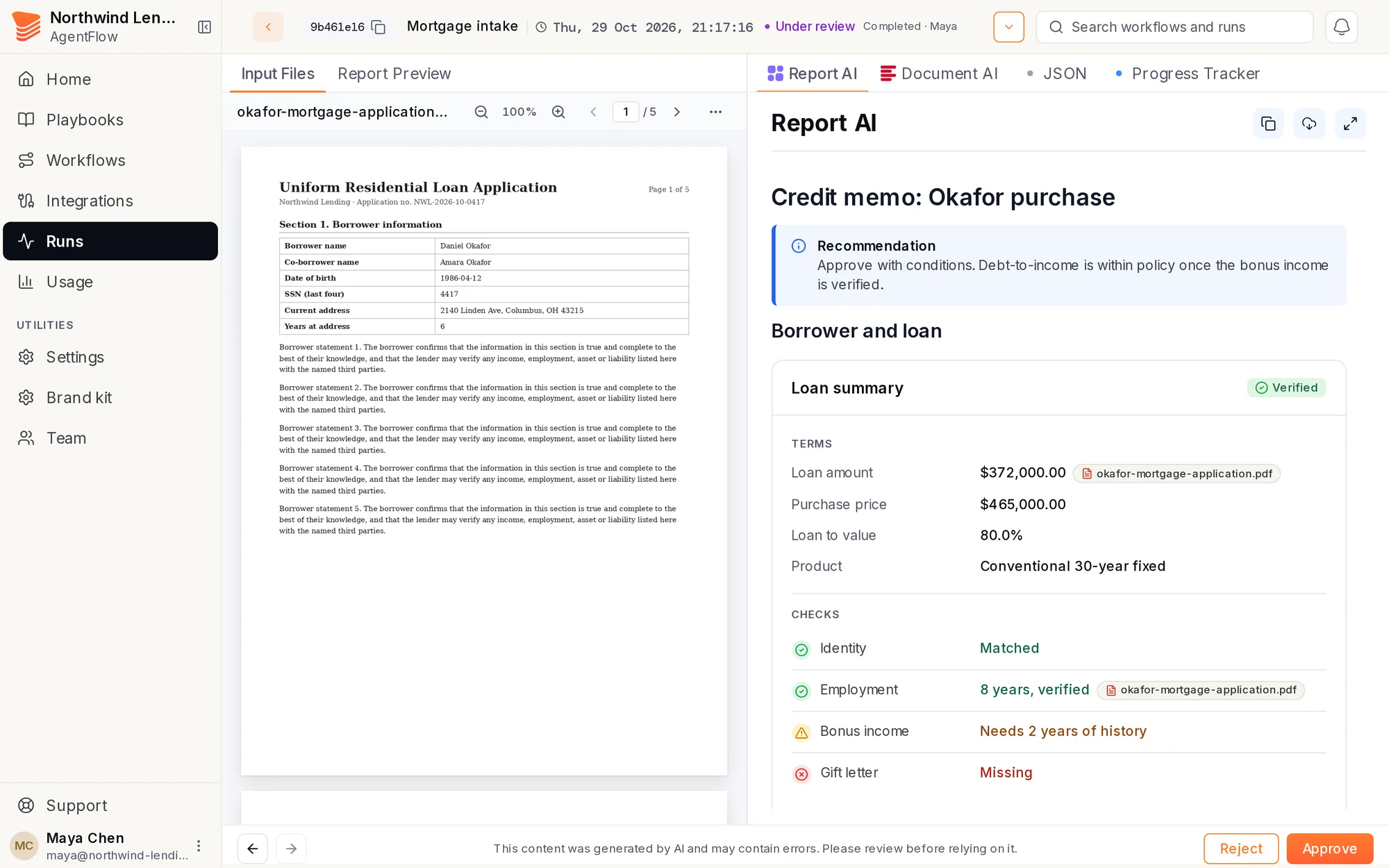
  • Report AI: rich reports with an expanded reading view.
  • Conversational AI: a chat that handles question-by-question flows, renders tables, code and images, and scrolls wide visuals sideways.
  • Decision AI: its inputs and outputs on the review page, refreshed as soon as a reviewer saves a change to the extracted data.
  • Classification, multi-agent runs, and a progress tracker for each step of a run.

What changed. Each new agent arrived with a screen to review it. The tab row on the review page, Report AI, Document AI, Conversational AI and Progress Tracker, is that work.

The Report AI tab: a credit memo with its recommendation and checks
Today's Report AI tab beside the input file. Demo data.

AgentFlow v3

Sep 2025 – Oct 2026

In late 2025 the app moved to a new shell, sidebar and header. Through 2026 the work turned to making it one product: shared parts, faster tables, and features clients asked for by name.

One design system

The problem. Home, Runs and Usage looked like three different products. A count of the code found 1,689 hand-typed colours (348 distinct), 33 separate status-to-colour maps and 417 font sizes typed as pixels.

What I did.
  • Audited every v3 screen with a Playwright capture rig: 166 verified findings, 141 more checked and thrown out.
  • Wrote the spec and made the calls: one token set, one status pill and one set of tones, one type ramp. Kept the brand orange even where it costs contrast, on purpose.
  • Shipped it as a stack of nine pull requests, with a pixel-diff check proving the colour codemod moved nothing on screen.
  • Added a lint rule, no-off-canon-color, so the next one-off colour fails the build.

What changed. The whole stack merged on 22 September 2026. Every page now reads as one product, and new screens start from shared parts instead of copies.

331

status-to-colour maps

The Runs page built from the shared tokens and status pills
The Runs page on the new tokens. Demo data.

Finding work, fast

The problem. Reviewers search all day, and the tables fought them: slow search, sort controls that only showed on hover, statuses that did not match between the table and its filter.

What I did.
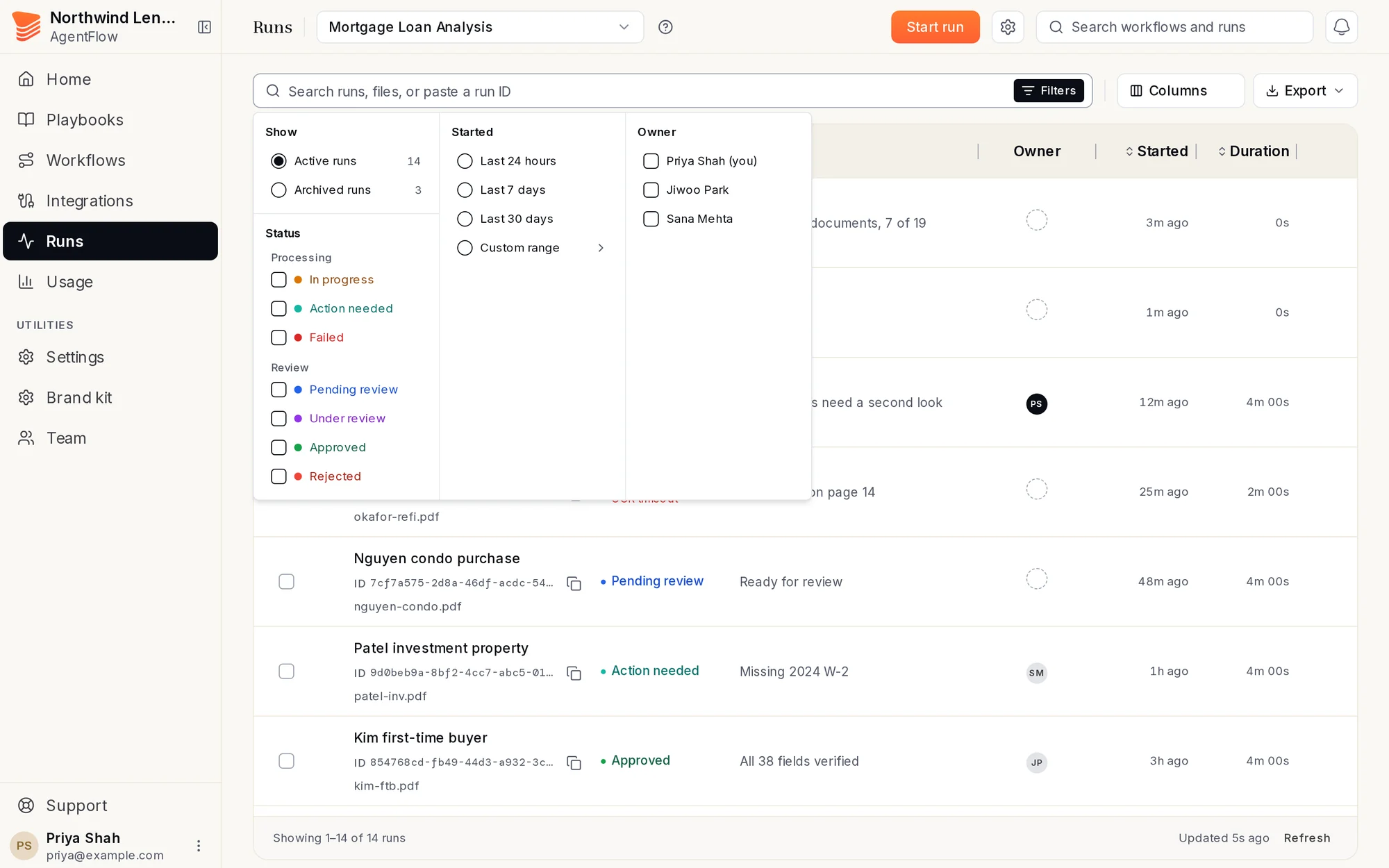
  • One filter bar shared by every table: chips for what is set, one search field.
  • A status filter that can tick a Processing and a Review status together, which took a backend change as well.
  • Sort arrows visible at rest on every table, and one status, one colour, everywhere.
  • Workflow search that filters in the browser instead of asking the server on every key.

What changed. Typing “forum cu” used to send 10 requests and leave the list unfiltered; now it sends none and matches in 23 ms. Filter use went from about one in ten users to about seven in ten.

~10%~70%

of users filter their runs

The Runs filter panel with status groups
The shared filter panel on Runs. Demo data.

Credits you can see

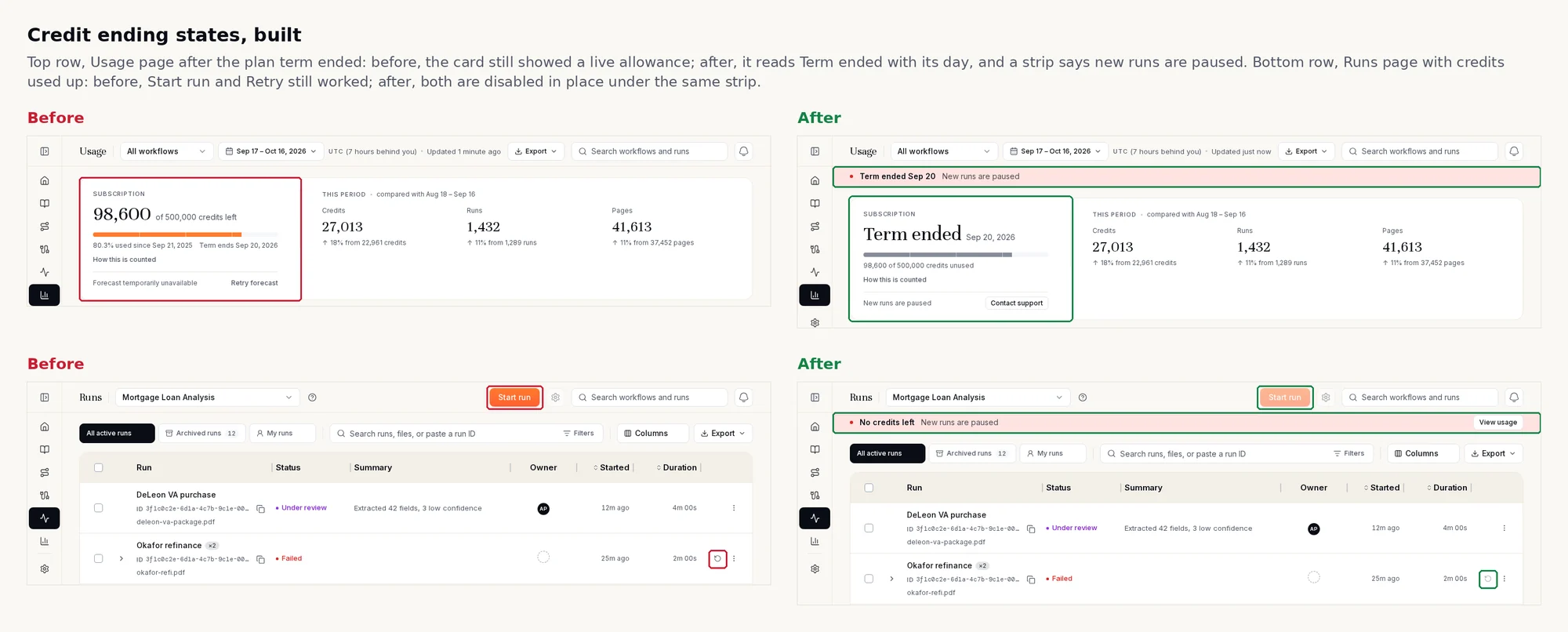
The problem. A client's Usage page still said “Term ends Sep 20” three weeks after it ended, and nothing in the app said credits were nearly gone. Nothing stopped a run at zero, either: one client had run about 2,575 credits past its term.

What I did.
  • Built the Usage dashboard through round after round of client feedback: date ranges you can type, totals that agree across pages, a layout that holds at laptop widths.
  • Drew 26 design boards for running out: four treatments across four states. Picked a strip on every page plus the state on the Usage card; dropped the bell, because a bell is easy to miss.
  • Set the rule with the team: credits cannot go over. At zero, or after the term, uploads and new runs stop and the app says why. Wrote the backend side, which refuses those requests.

What changed. Shipped as one pull request per repo in October 2026. Review caught two real gaps, both fixed; 158 regression checks pass, and the stopped card keeps the live card's height so nothing jumps.

Before and after: the Usage card and warning strip when credits are ending
Before and after the credit-ending states.

Runs that name themselves

The problem. Runs were named after the uploaded file, or not at all, so a reviewer looking for one applicant's loan scrolled through “scan_0042.pdf”. In client interviews it was the top complaint.

What I did.
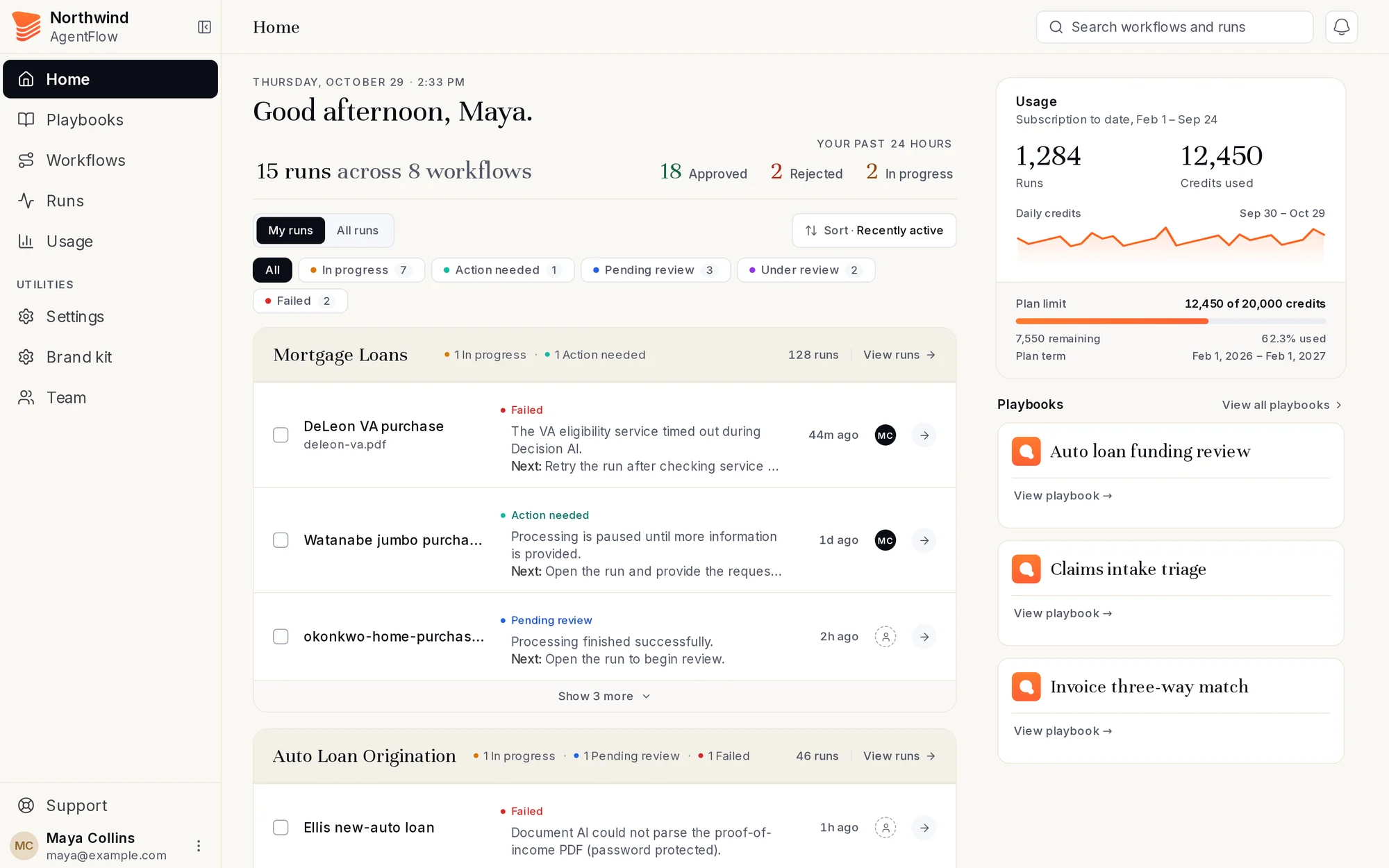
  • Names built from what is inside the document, in a fixed order of sources, and a five-to-seven-word summary that never opens with the status.
  • Let workflow authors tell the AI what their runs should be named after.
  • Masked emails and long numbers before anything reached the model: 0 of 28 personal-number probes leaked.
  • Made naming a 40,000-row table go from 3.2–3.6 s to 1.0–1.5 s.

What changed. Every run that does not fail now carries a name and a summary, in the table and in notifications. One lesson stuck: a small stand-in model passed my tests 12 times out of 12 while the real one did not, so the real model now gets checked before merge.

Home showing runs with AI-written names and summaries
Runs with their AI-written names and summaries. Demo data.

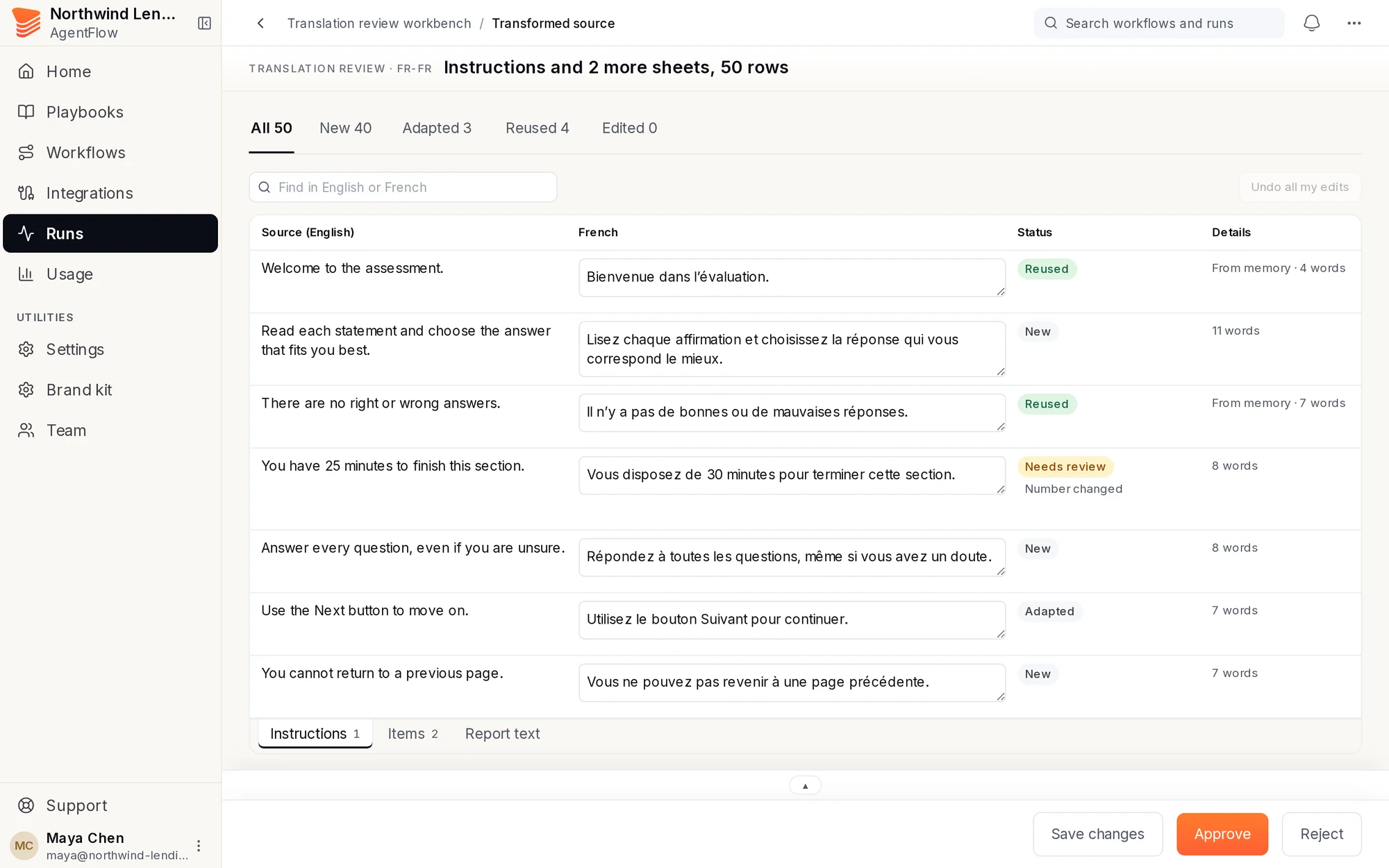
A workbench in six days

The problem. A prospect told us they would sign with a competitor because we had no screen for reviewing translations. The team won one last chance: show it working within a week.

What I did.
  • Owned the review side: the Runs list as a review queue, and the page for checking one translated workbook.
  • Built it from reusable review widgets: auto-save, status pills, Find, sheet tabs like Excel, a pinned pager for 300 rows at a time, and an editor where the caret steps through HTML tags one character at a time.
  • Ran all 12 of the prospect's sample files through the real pipeline and checked every row.

What changed. First cut in three days, client test on schedule. By the last round all 12 files reached review with every row translated and no code lost; 19 of 5,867 rows were flagged for a person to check.

6 days

from the call to the client's own test

The translation review page with status pills per row
The translation review page. Sample content.

Data that steered the design

The problem. The five main pages had 132 clickable things and not one named analytics event, so every design argument was opinion.

What I did.
  • Defined the tracking events for every main page in PostHog and shipped them.
  • Read 30 days of real use, customers only.

What changed. The numbers settled the Home redesign: almost everyone opens documents from Runs, and a typical Home visit lasts 7 seconds. Home became a doorway into each workflow's runs instead of a second Runs table.

Runs table84%
of document opens start here
Home5%
of document opens start here

How I worked

Most of this ran as parallel AI coding sessions that I directed: one worktree and one agent per lane, each held to written rules, tests and a review before anything merged. AI made the work fast; I read, tested and own what shipped.

Have a project in mind?

Tell me what you need built, web or mobile, design to backend. I will come back with a plan.

Hiring a software engineer?

I am open to full-time roles. Let’s talk about your team and the work.